Karlen Communications
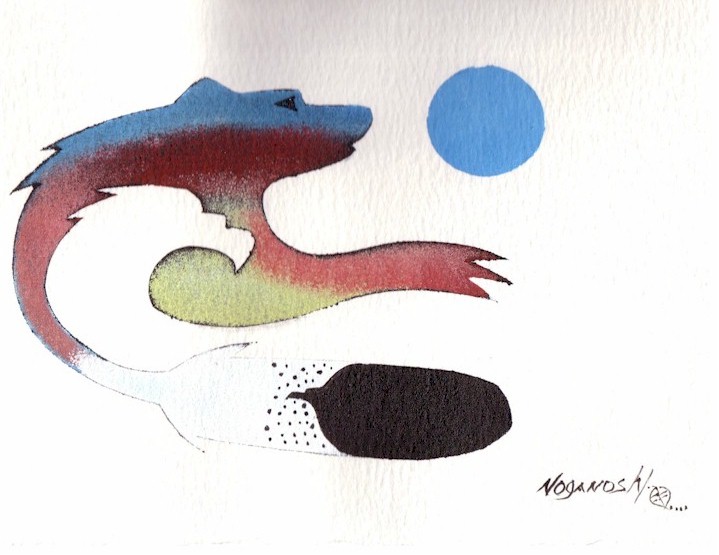
Our logo was designed by a native artist and captures the spirit of who we are and what we do. The image represents the harmony between man and woman. The silhouette of the eagle represents the spirit of the woman in the image of the bear which symbolizes man. the feather represents the passing of knowledge by the teacher to the student. If you look carefully, there is the head of a loon at the base of the dark part of the feather. The loon was the only animal who would dive to the bottom of the lake to retrieve medicine that would restore the sight of the chief of the artist's tribe. The loon holds an honoured place in native history. This logo has so many dimensions that it allows those who view it to explore their creativity...which is also what we like to do. We are not "one thing" but many - in business and in person.
We are currently updating this site, please contact us if you don't find what you're looking for. [April 2008]
PDF Accessibility
Our strength is in the creation and repair of tagged and accessible PDF. Tagging a PDF document is only one step in the process. It is impossible to separate tagging from usability when working with PDF documents that should be accessible. This site has a page on accessible PDF resources.
As a result of the work I do in tagged, accessible, and usable PDF documents, the book on logical document structure evolved as did workshops on how to create well designed and structured documents using Microsoft Office applications. This includes Office 2003 and 2007. The principles can be applied to any other application were content is being developed that will end up as tagged PDF.
Other workshops and consulting topics include instructional design and eLearning development. Please visit the Products web page for more information.
Microsoft Office 2007
Microsoft Office 2007 Accessibility Resources.
Enterprise Licensing for Online Courses?
Criterion 508 Solutions provides web audits and PDF accessibility audits, repairs, and training. Karen McCall sub-contracts to Criterion as a specialist in tagged accessible PDF documents. The following courses are available for enterprise licenses only. Contact Criterion 508 Solutions for more information.
- Recently updated for JAWS 9 is the Criterion Accessibility Academy online course "Web Accessibility Testing Using JAWS."
- Also recently updated for Adobe Acrobat 9 is the Criterion Accessibility Academy " PDF Testing and Repair."
Visit the Criterion 508 Solutions web site for more information on this company and its work on Section 508.
Free Resources
These documents are in RTF format.
- Basic Computer Literacy Checklist. this can be used for assessment or training, by people using adaptive technology or people who don't use adaptive technology. If you say "I can use a computer" these are the things you should be able to do.
- CCTV/Video Magnifier Assessment Protocols. A form you can use if you are an assessor, trainer or person going for a CCTV assessment. This form is designed to be client based.
- Equipment Setup Checklist. When your computer is delivered, this checklist will help you verify the tools you need are working. this checklist is primarily for people who will have adaptive technology installed on their computer.
- OCR/Scanning Literacy Checklist. What you should know about your OCR/Scanning software after 10 hours of training. A resource for assessors, trainers and people who are being assessed or trained on using their scanning software such as OpenBook [Freedom Scientific] or the K-1000 [Kurzweill Educational Software].
- Screen Magnification Literacy Checklist. What you should know about your screen magnification software after 10 hours of training. This resource can be used by assessors, trainers and people being assessed or trained to use screen magnification software such as ZoomText [AiSquared] or MAGic [Freedom Scientific] .
- Screen Reading Literacy Checklist. What you should know about your screen reading software after 10 hours of training. this resource can be used by assessors, trainers and people being assessed or trained to use their screen reading software such as JAWS [Freedom Scientific], Window-Eyes [GW Micro], or HAL [Dolphin] .
- Voice Recognition Literacy Checklist. What you should know about your voice recognition software after 10 hours of training. Although this is based on Dragon NaturallySpeaking from Nuance, it can be applied to the speech tool in Microsoft Office or on a tablet PC. A resource for assessors, trainers and people who will be assessed or trained on using voice recognition.
Karen's Bio
Plays well with others, sometimes runs with scissors, ready to take a Quantum Leap...or go fly a kite!
Karen's resume!
Karen McCall has done tutorials for Freedom Scientific. They include the JAWS and Excel 2000, JAWS and Excel XP, and JAWS and WordPerfect 10 tutorials.
CSS Formatting
This web site uses an external CSS file to format everything. We hope this demonstrates that you can create interesting pages using guidelines for more accessible and usable web content. The advantage to an external CSS is that we can just substitute one piece of code and it will be reflected in every page we used the formatting. This saves time and lets you view your choices on all pages at once. Sometimes what looks like a good idea on the front page doesn't translate well to subsequent pages!
There are two good resources for creative CSS menus, the CSS Edge by Eric A Myer and "Listomatic."
Copyright
This site was created by Karen McCall using Adobe/Macromedia Dreamweaver 8. It was last updated April 2008. Copyright by Karen McCall and Karlen Communications.